
Our game app and website interface offer simplicity and ease of movement across sections and the dashboard. The moment you perform and complete the 51 Club register process and enter the game, you will feel excited by its pleasing appearance.

The Home page displays a colourful design with a gallery of game types. The rest of the sections – Home, Activity, Promotion, and Account are available on the navigation bar for quick access.
The platform offers modern, colourful gaming options for everyone, on the condition that you are at least 18 years of age or above. You can try your skills and gaming knowledge on various games. We will discuss some important games here, although our app hosts more than 500 games.
Lottery Games (Colour Trading/Prediction)
Also known as colour trading games, the Lottery games offer you the most thrilling and profitable game types. There are four games under the Lottery game category.
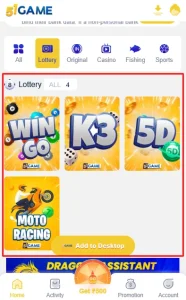
- Win Go: In this game, you will use your prediction skills in seed and colour-based play sessions.
- K3: This is a three, colourful dice play game, and you will play it using the big-small and odd-even strategy to win your rounds.
- 5D: You will play your rounds using five-digit number strategies along with big-small and odd-even input/selections.
- Motor Race: You can play this game by putting in your input amount on certain numbers in circular objects of different colours and selecting odd-even and big-small strategies.
Chicken Road 2
An animated chicken needs to walk down the dangerous road full of traffic. You will help it walk down the road while avoiding those dangers. The game uses a provably fair and RNG algorithm.
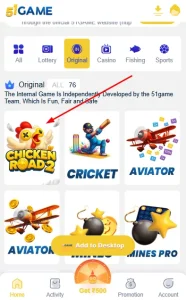
As the animated chicken reaches a certain level after crossing the dangers, you will receive a multiplier value. Your result will be the multiplication of your input amount by the multiplier value.
Aviator Game
In the Aviator game, you will let your virtual plane fly for a longer period. As the plane rises, you will receive a multiplier value. You will quickly try to cash out depending on the choice of your current multiplier value.
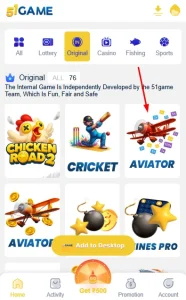
You will receive your result by multiplying the current multiplier value (when you cash out) by your input amount. This gaming option, along with Chicken Road 2, is the riskiest among all other games.
Slots Games
This game category offers the most satisfying and profitable gaming options for players who like reel-spinning play sessions. Among all the categories on 51 Club, it has a huge list of game types. Most of the games are reel-based but with different elements, characters and symbols with colourful and interesting designs.
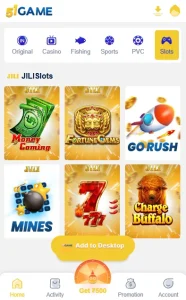
For modern players opting for the 51 club game online, Slots is the ultimate destination because of the variety, such as Money Coming, Fortune Gems, Hot Spin, Aurora Wilds, Grand Wheel and many other games.
PVC Card Games
This is another colourful card-based game. You will use your prediction skills in modern card games with traditional game strategies. You can play games like V8 Poker, 365 and Kooblet.
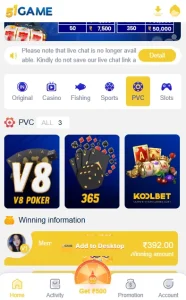
These games are fun and exciting, but require high skill and proper strategy. Unlike the 51 Club Lottery, you need patience to make real cash.
Who Can Play the 51 Club Game?
You need to be at least 18 years of age to enjoy these colour prediction games. You should also be familiar with using your device, particularly your smartphone. You need to maintain a reliable internet connection. You should be someone who can understand the policy and accept it.
- Click on the button provided above.
- Upon clicking, a 51 Club APK file will be downloaded.
- Now, click the downloaded file on your device. This will start installing the app.
- Let the installation complete. Enjoy the game after the installation is complete.
If you do not like the above steps, you can first register for the game, complete the 51 Club game login and start the download using the following methods:
Method 1: Direct Download Method
- As mentioned above, sign in to the game.
- Click the “Download icon” in the top right corner of your screen.
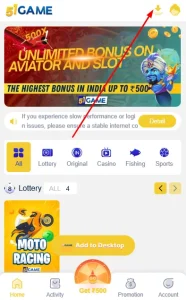
- After completing the above step, you will be directed to a new screen displaying two options: Quick Installation and Complete Installation.
- Now, click the second download option, “Complete Installation”.

- The APK file of the 51 Club game download will begin downloading.
Method 2: “Add to Desktop” Method
- First, you will sign in to your game account.
- There is an “Add to Desktop” button on your Home screen just above your navigation bar.
- Now, click the “Add to Desktop” button to continue the download.
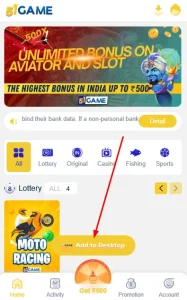
- You will see a Download page with two options: Quick Installation and Complete Installation.
- Click the “Complete Installation” option to download the full package version.
- Your 51 Club game APK file will start to download for you.
How Can You Install the 51 Club APK?
Proper installation requires the correct procedure. Here is how you can complete the installation with the correct procedure.
- First of all, you need to enable or allow the “Install from Unknown Sources” option in your device’s settings.
- Next, in your device’s file manager, locate the downloaded APK file that you completed above.
- You will now tap on or press the APK file and select the “Install” option.
- The installation process will occur automatically.
- Allow some time for the installation and let it complete the process on your device.
- The APK file will completely install on your device.
- Click the above button to open our official game registration page.
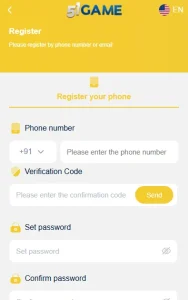
- And now, you will enter your mobile number (10 digits).

- Then click on “Send OTP” under the Verification table to receive a one-time verification code.
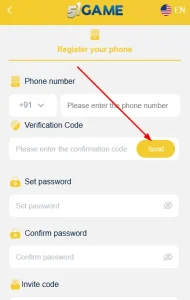
- You will now input the OTP (One-Time Password) in the available box that you received on your mobile number within the given time.
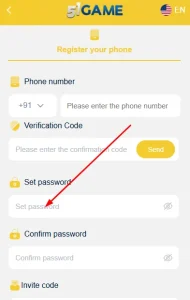
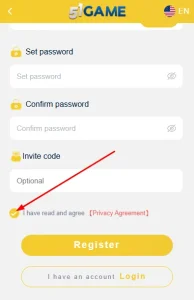
- Then, create a strong password using a combination of 8 characters that includes both letters and numbers, for the security and safety of your data.
- Enter the password again to confirm it.
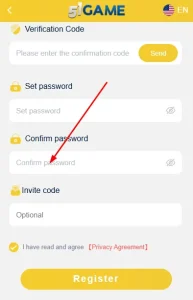
- After that, you will enter the invite code to receive bonus rewards.

- You will need to accept the terms and conditions by checking the box: “I have read and agree [Privacy Agreement]”.
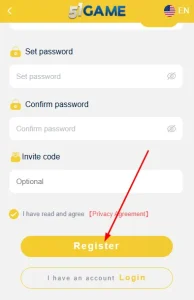
- Finally, you will click the “Register” button to complete your account creation, and after paying your deposit, start gaming.
What Things Should You Keep in Mind While Registering?
To take advantage of the full benefits of the 51 Club games, you must keep certain things in mind. The following are some of the important points to keep in mind:
- Please ensure that you use your own mobile number (email is optional) for verification and security purposes.
- And you will create a strong, memorable password that you will not forget.
- You will use your invitation code during registration to claim bonuses after you are eligible.
- Provide accurate financial details to ensure a smooth withdrawal process.
- You will never share your login or transaction information with anyone, not even with your family members, for security purposes.
- Also, you will complete your profile with your information for better security and higher limit access.
- First, click on the above button to open the login page of the 51 Club game.
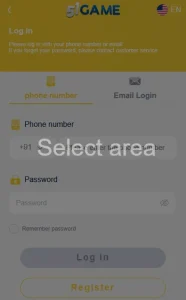
- Enter your registered mobile phone number.
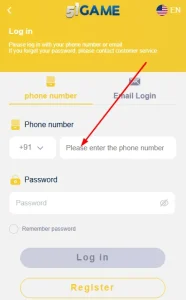
- Now, enter the password you created while registering your account.

- Finally, you will click the “Login” button.
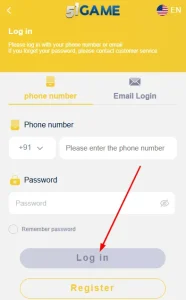
If you are logging in using the app, then just open the app, go to the login window and enter your credentials and click the Login button.
How Do You Log Out of the 51 Club Gaming Platform?
Whether you are inside the game app or the web browser, you will use the following steps to log out. The purpose is to help you securely log out of our platform.
- Click the “Account” section on your navigation bar/menu.
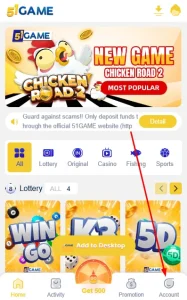
- Scroll down to the bottom of your screen.
- Now, find the “Log out” option below the service centre. Click on it.

- Finally, you need to click the ‘Confirm’ and exit from the game.

How Do You Reset Your 51 Club Game Login Password?
To reset the password, there is a list of steps. We will guide you on how to reset your password:
- You will click the “Forgot Password” button available on your login screen.
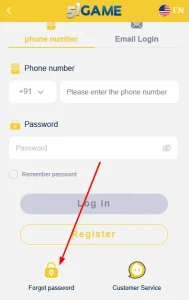
- Enter the mobile number you used during registration.
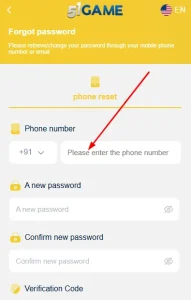
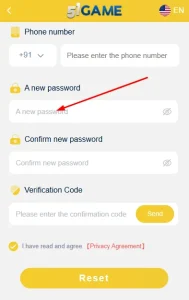
- Create a new password and make it strong.
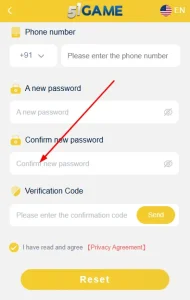
- Enter your created password again to confirm it.
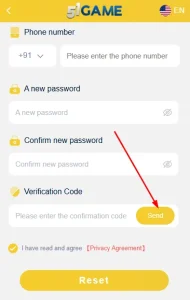
- Click the “Send” button to receive the verification code on your device.
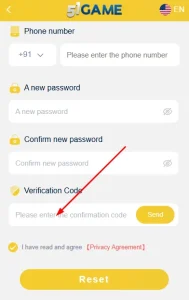
- You will now enter the one-time verification code in the required field.
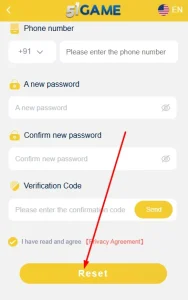
- Tick the check box and accept the “I have read and agree [Privacy Agreement]”.
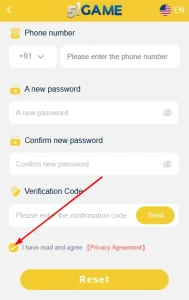
- Finally, click the “Reset” button, and your new password creation process is complete.
You can pay your deposit in your wallet using simple steps. You can follow the steps given below:
- First, you will log in to your game.
- And you will go to the “Account” section.
- Select the ‘Deposit’ option.

- Click the preferred methods of payment gateways.
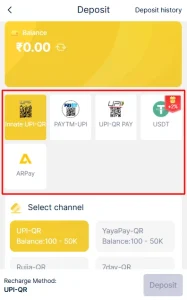
- Enter the amount and submit the request by clicking the Deposit.
Now, we will guide you through specific and detailed steps in the following sections. You can choose one of your options according to the payment gateways.
Please note that we will discuss payment options under QR, UPI, and USDT. And the QR and UPI channels include Innate UPI-QR, UPI-QR Pay, and PayTM. PayTM does not specify QR and UPI separately, though.
UPI Gateway: Innate UPI, UPI Pay, and PayTM-UPI
- Click the payment gateway option of your choice from Innate UPI, UPI Pay, or PayTM on the Deposit screen.
- You will choose the “Amount” as per your requirement (e.g.,₹200.00 as the lowest limit).
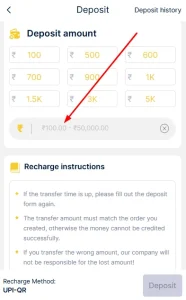
- Start the payment process through the “Deposit” button on our 51 Club colour prediction platform.

- You will see a unique UPI ID (example: abc@upi) on your screen; you will copy it.
- Now, you need to open the UPI app (e.g., Paytm, GPay, PhonePe, BHIM) on your personal device.
- After that, select the “Send Money” option and enter your UPI ID (copied from the above step) on the payment gateway page.
- You will enter the exact amount to complete your transfer to your wallet.
- Please confirm the payment and allow some time for the transfer to complete.
- Now, copy the Reference number of this transaction.
- Go to the same page you left before opening the payment app.
- On this page, you will see a blank option to fill in the payment reference number. Paste the reference number here and click submit.
- Within the given timeframe, you will notice the amount to display in your wallet.
QR Scan Gateway Option: Innate QR, QR Pay, and PayTM-QR
- First, you will click the payment gateways (either Innate QR, QR Pay, or PayTM ) on your Deposit section.
- Select the “Amount” of your choice, e.g.,₹200.00 as the lowest limit and ₹50K as the maximum.
- Start your payment process, and a QR code screen will appear for you.
- Open the payment app on your smartphone, like Paytm or Google Pay and scan the QR code displayed on your screen of the game.
- Please submit the payment, and allow some time for the transaction to be processed.
- Your amount will appear in your wallet within the specified timeframe or after some time.
USDT – Deposit through the TetherPay for Crypto Users
- Open and launch the USDT payment gateway from your Deposit section.
- Select the “Amount” of USDT of your choice: T10.00, T100, or more.
- After that, start the Deposit transfer process, which will give a new screen.
- Now, on the new screen, you will copy the populated wallet address (from your screen when it displays).
- Open your cryptocurrency wallet and start the transfer to the copied address (after you have pasted it into your wallet).
- You will now enter the requested USDT amount and finish the deposit to your game wallet.
- Submit the transaction hash through your TRC20 crypto channel, and then you will wait for some time for the blockchain network confirmation.
- After the confirmation and verification from the TronIX network and your banking network, your wallet will display the amount for you.
You have three options to withdraw money from your wallet. Our platform allows you to transfer money through Bank Card, UPI and USDT. We will discuss steps for each of the transfer options.
Bank Card Withdrawal Option
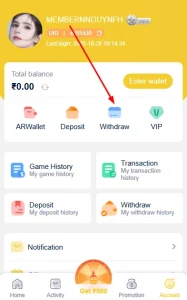
- Go to the “Account” section.
- Then, open the “Withdraw” option.
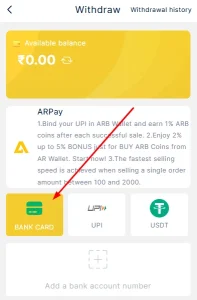
- Click on the “Bank Card” option.
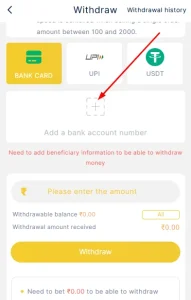
- Now, you will click the plus sign (+) available just above the tag with “Add a bank account number”.
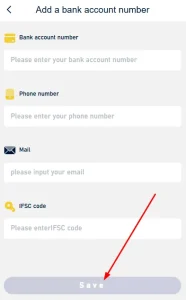
- Please fill out the form according to the on-screen instructions as follows.
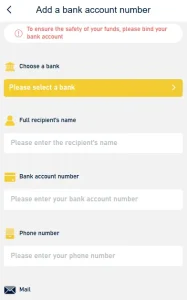
-Recipient name
-Bank account number
-Phone number
-Email address
-IFSC Code
- Then click the “Save” button.
- After that, you need to activate and link the payment channel/option, and click “Bank Card” again.
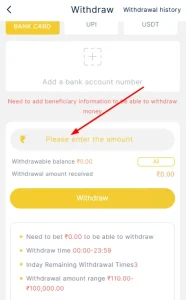
- Now, enter the amount (range: Rs 110 to Rs 100000) you want to transfer from your Wallet to your bank account.
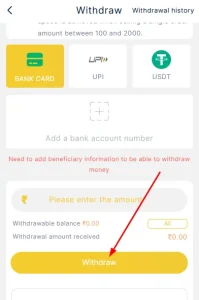
- Finally, you will click the “Withdraw” button to finish the transfer.
UPI: Withdrawal Option
- First of all, sign in to our game app.
- After that, you will click the “UPI” icon on your “Withdraw” page.
- Below your “UPI” icon, you will see a plus sign with the “Add UPI” tag.
- Click on it and then also on the “Add Payment method” in a yellow background that appears for you on the next page.
- You will now enter the UPI name.
- Next, you will enter your UPI ID.
- And then confirm your UPI ID.
- Now, click the “Save” button.
- After completing the activation and linking of your bank account, you will come back to your “UPI Withdraw” screen.
- Now, you need to enter the amount (with a range of Rs 700 to Rs 50K) and submit the “Withdraw” request button.
USDT: Withdrawal Option
- Log in to our 51 Club official website or app version on your device to open your “Withdraw” option.
- Now, after opening your “Withdraw” button, you will click the USDT tab.
- You will now click the plus sign (+) with the tag “Add address”.
- This will open a screen with some blank tabs/boxes.
- In this step, you will paste your TRC20-compatible USDT wallet address that only belongs to you.
- You will need to enter and confirm the Address Alias on your screen.
- Verify and ensure that the entries are accurate to prevent errors during your transfer process.
- Activate the USDT payment gateway with your bank account, and also link it to process the transaction smoothly.
- After filling all the boxes or entries, you will click the Save button.
- Now, you will enter your money (within Rs 1,000.00 to Rs 1000000) to withdraw from your Wallet.
- You need to review the entries for the last time and click the Withdraw button to submit your transfer request.
- Depending on the traffic of your wallet’s blockchain system and confirmation, your bank account will display the requested payment transfer.
If you face any issues in the game interface or login-related issues, payment-related issues, our 51 Club customer support is always available to help you. There are two ways you can contact our customer service.
How to Contact Customer Support Before Login?
If you are a new player and have not registered for our game yet, here are the steps to contact our customer support.
- Go to the login page of the game. Scroll down and click on the “Customer Service” button.
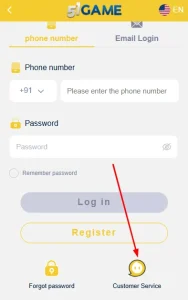
- A page will open with a list of login-related issues. Select the issue you are facing.

- Fill in all the details with screenshots if required.

- Click on “Confirm” to submit the query.
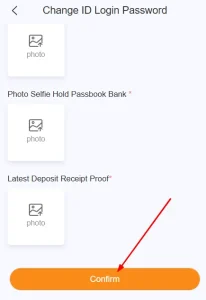
However, through this portal, you cannot resolve issues like the 51 Club gift code, billing, bonus, etc.
How to Contact Customer Support After Login?
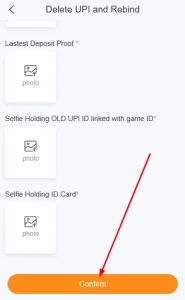
- You will click the “Account” section on your navigation bar.
- Scroll down a bit and locate the “Customer Service” tab. This tab is actually the Customer Support portal. You will click on it.

- Select your issue type from the given list of issues.

- Fill in the details, describe your problem and attach the screenshot if required.

- Then, click on “Confirm” to submit your query.
Our development team keeps updating the platform with events, tournaments with particular games and promotions with some tasks. Through these events and promotions, you receive the opportunity to make wins.
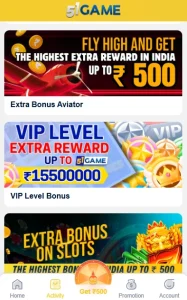
- First Recharge Bonus: You may qualify to receive a bonus for your first ever deposit in our game(into your wallet).
- Extra Bonus on Slots: In this event, you will receive a bonus for each of the rounds you play on Slots. But there are some criteria you will need to fulfil.
- VIP Level Extra Reward: Get yourself to a VIP level player after gaining qualifying experience, and receive different bonuses.
- Lottery Daily Wager Ranking: You may qualify for the bonus only applicable to Win Go games. You will need to maintain a specific frequency of input amounts for a certain duration.
The game platform offers many important and foundational features that we discussed earlier. Other features make our game very interesting and profitable.
Language Change
You can change your language preference by following the steps given below.
- Visit the “Account” section in the navigation bar.
- Click on the language option.

- Then select the desired communication medium from English, Hindi, or other regional languages.

Bonuses
There are various bonuses like first deposit, daily play attendance and other exclusive rewards. You will qualify for them after proper validation of your membership and after approval from our development team.
Refer and Earn Program
You can join the 51 Club Referral program, where you will invite your referrals (friends, relatives, and coworkers) to join us. When they join us and pay their deposit, you will receive refer and earn program-based commissions.
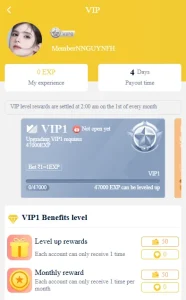
VIP privileges
When you play our game consistently and gain experience to a certain level, you will gain the VIP tag. Upon receiving this VIP-certified membership, you will be eligible to enjoy VIP privileges.
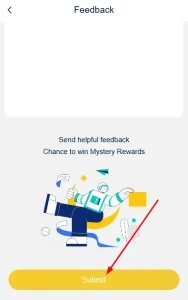
We love to receive your feedback. Help us improve our games and platform with your feedback. To submit your feedback, please use the following steps:
- Go to the “Account” section on your Navigation Bar.
- Click on the “Feedback” tab available below the Service Centre.

- On the next page of your Feedback query input box, you will type in your feedback.
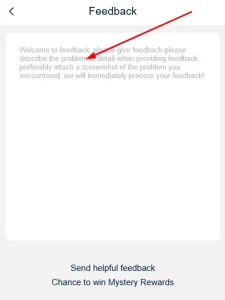
- Click the “Submit” button to send it to us.